

 HANDS ON SharePoint
 HANDS ON Teams
 HANDS ON Lists
 HANDS ON tek
 M365 Admin
What’s new for SharePoint – January 2026
January started quietly but picked up pace as the weeks went by. It wasn’t the busiest month for SharePoint news, but it still brought a few solid updates worth your attention.
Two changes to core web parts stood out. The Power BI web part is reaching the end of its support lifecycle, and the Maps web part is shifting from Bing Maps to Azure Maps—a change that will influence how we build pages going forward. On the AI side, the Knowledge agent keeps getting smarter, now supporting listening to page content in more languages, making your existing info even easier to consume.
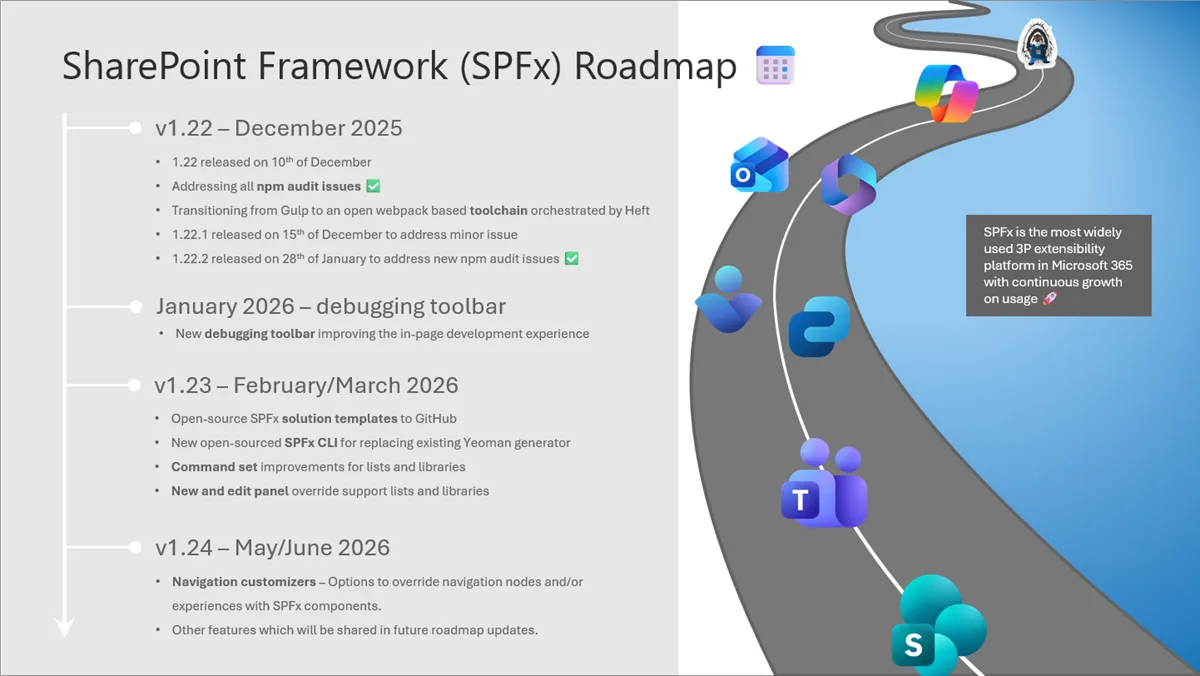
And beyond the usual product updates, Microsoft dropped the new SPFx roadmap—the biggest update the framework has seen in years; and also announced the plans for the SharePoint 25th anniversary celebration happening on March 2nd. You’ll find all of this and more in the full post.
JAN
6
Starting April 2026, SharePoint Online will retire legacy features like Information Management Policies and In-Place Records Management. Organizations must migrate to Microsoft Purview Data Lifecycle Management and Purview Records Management, as older features will no longer be supported or accessible. Planning and migration guidance is provided.
JAN
8
SharePoint Embedded apps will support container archival starting February 2026, reducing storage costs by up to 75% and improving Copilot search by prioritizing active content. Admins must opt in via PowerShell, use new Graph APIs, and update apps to manage archived containers. No compliance issues noted.
JAN
14
Support for the SSRS Report Viewer SharePoint Webpart ends April 13, 2026. It will remain functional but unsupported. Organizations should transition to embedding SSRS reports in SharePoint using URL parameters. No admin action is required, and no compliance issues are identified.
For nearly 25 years, SharePoint has powered how organizations connect, collaborate, and manage knowledge at scale. Today, more than a billion people rely on SharePoint every month to store content, share ideas, and turn information into impact.

JAN
21
Adaptive Scope for SharePoint is a dynamic scoping capability in Microsoft Purview DLP that allows administrators to automatically target DLP policies to the right sites based on attributes such as site URL, site name, or custom site metadata. Unlike static scoping, which requires manually listing sites and maintaining them over time, adaptive scopes continuously evaluate site properties and auto‑include or exclude locations as they evolve. This enables scalable policy deployment, eliminates the 100‑site static policy limit, and delivers granular, and automated targeting.
JAN
22
Microsoft 365 Archive is designed to help organizations manage their inactive data efficiently. It allows you to move inactive SharePoint sites into a cold storage tier, which reduces storage costs while maintaining the same searchability, security, and compliance standards as active data. This feature is already available in Production and is now being released to GCC-L cloud.
JAN
26
Microsoft 365 Copilot is expanding AI audio overview support in Viva Connections and SharePoint, adding more languages and AI-generated audio summaries for site pages and news posts. The feature rolls out from January to February 2026, is on by default, and requires no admin action.

JAN
28
The SharePoint Maps web part will migrate from Bing Maps to Azure Maps starting March 2026, completing by mid-April. Key changes include renaming, removal of business entity search, limited autosuggestions for some Asian languages, and removal of bird’s eye and street view. Admins should update allowlists and network settings.
Email customization for Site Lifecycle Management policies is now generally available, allowing SharePoint admins to tailor notification emails to site owners. This feature applies worldwide and lets admins modify subject lines, message bodies, and guidance URLs without changing existing policy behavior. No action is needed if default emails suffice.
Looking ahead, 2026 is set to be an important year for SPFx. In addition to the new monthly minor release model, we are preparing a set of roadmap updates that focus on developer productivity, long term sustainability, and better alignment with the evolving Microsoft 365 platform investments.
JAN
29
Dark mode will now be supported in SharePoint Admin Center.
The way work gets done continues to evolve. Across organizations, everyday tasks are moving beyond manual handoffs toward intelligent, connected workflows where AI helps coordinate activity and people focus on outcomes.
JAN
31
eSignature for Microsoft 365 will add a drawn signature option for signing PDFs, allowing use of stylus, touch, or mouse. Rolling out worldwide from mid-March to mid-May 2026, enabled by default with no admin changes needed. Users can switch between drawn and typed signatures.







No comments yet