

 HANDS ON SharePoint
 HANDS ON Teams
 HANDS ON Lists
 HANDS ON tek
 M365 Admin
How to Build a SharePoint Contact List with Internal and External Users
When I wrote about building a project index in SharePoint, I intentionally focused on structure and discoverability. A single place to see all consulting projects, understand what they are about, and navigate to the right site without friction. In practice, though, every time I implement that pattern, I end up adding one more list almost immediately: a contact list built specifically to store the contact information of everyone involved in the project.
Projects are defined as much by people as they are by sites and documents, and in consulting those people are rarely all internal. Customers, partners, and external stakeholders need to be visible in the context of a project, even when they are not and should not be part of the tenant.
Why contacts need their own model
SharePoint people web part and lists people column work very well for internal users, but they are not designed to represent everyone involved in a project. External contacts often do not exist in Entra ID, and inviting them as guests just to store a name or an email address creates more problems than it solves. As a result, contact information tends to drift into documents, notes, or spreadsheets that are disconnected from the project structure.
At that point, the project index still works, but the human side of the project becomes fragmented. That is where a dedicated contact list starts to make sense.
A hybrid contact list that works for both internal and external users
The pattern I use combines two approaches in the same list. Internal users are stored using a people column, preserving identity, profile information, and consistency with the rest of Microsoft 365. External contacts are represented using custom fields that describe the person rather than trying to resolve them as a user. Email address, company, and role are treated as data, not as accounts.
Both internal and external contacts live in the same list. The distinction exists in how the data is stored, not in how it is consumed.
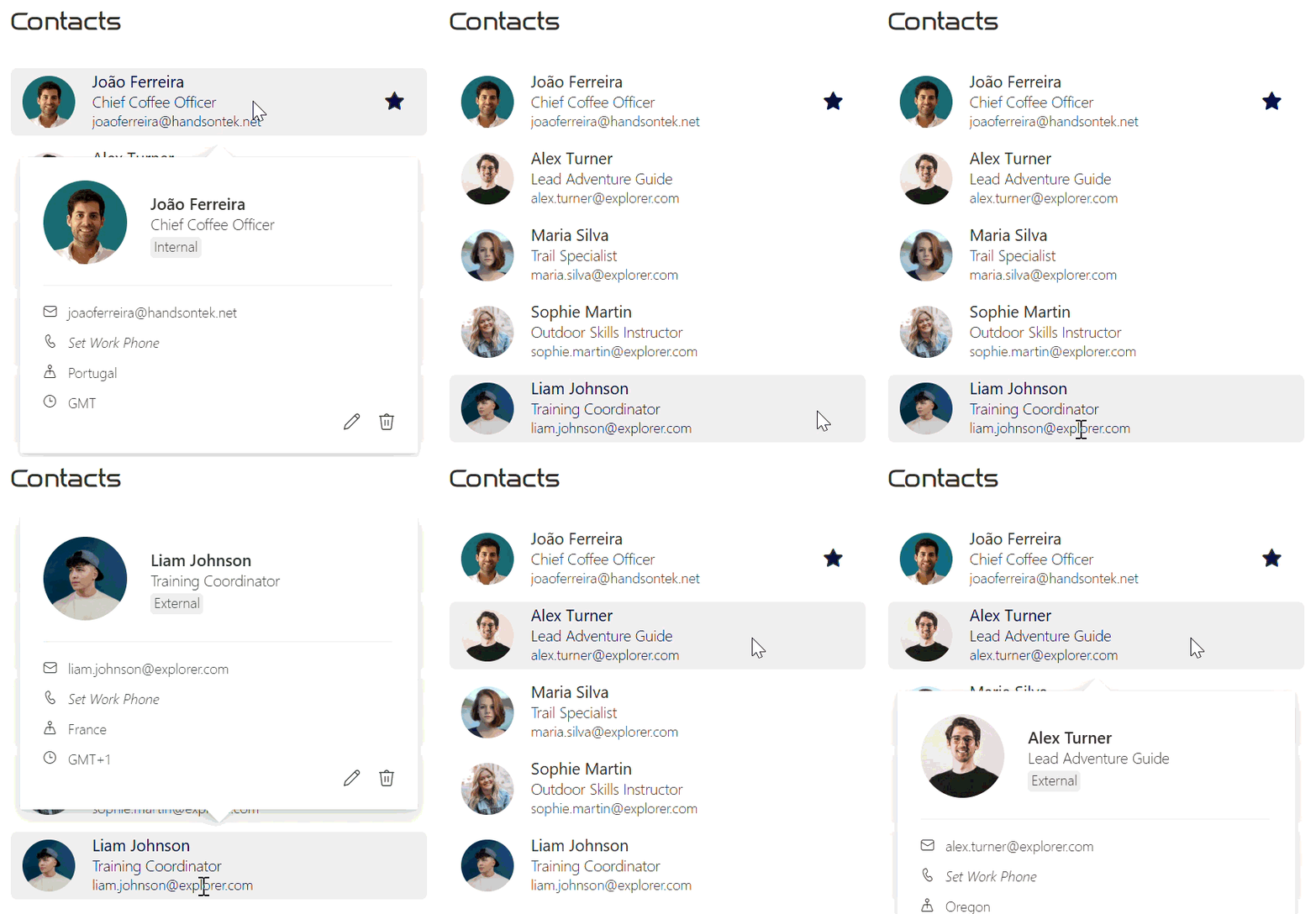
Once the contact list is added to a project site, a custom formatting is applied to present internal and external users in the same layout. The formatting handles the differences quietly, while keeping everything visually consistent and easy to scan. From the perspective of someone working on the project, there is simply a list of relevant contacts, regardless of where those people live.
Contact list structure
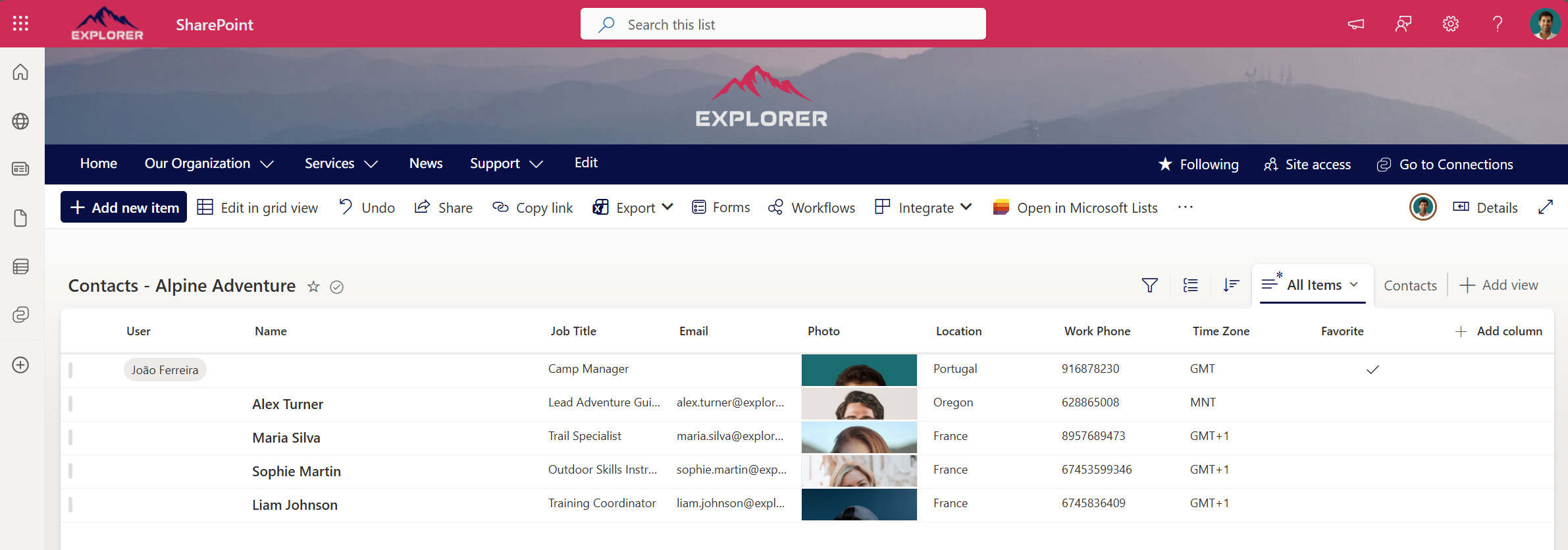
If you would like to replicate this pattern on your own project or consulting sites, the first step is to define a consistent contact list structure.
Create the list
Create a standard SharePoint list using the defined columns, including a people column for internal users and custom fields for external contacts.
| Name | Column type |
|---|---|
| Title | Single line of text |
| User | Person or Group (Used just for internal users) |
| Job Title | Single line of text |
| Single line of text | |
| Photo | Image |
| Location | Single line of text |
| Work Phone | Single line of text |
| Time Zone | Single line of text |
| Favorite | Yes/No |
Add the JSON formatting
Open the list formatting panel and paste your JSON definition.
{
"$schema": "https://developer.microsoft.com/json-schemas/sp/v2/row-formatting.schema.json",
"schema": "https://developer.microsoft.com/json-schemas/sp/v2/row-formatting.schema.json",
"hideSelection": true,
"hideListHeader": true,
"debugMode": true,
"rowFormatter": {
"elmType": "div",
"style": {
"padding": "0px 10px",
"margin-bottom": "8px",
"border-radius": "5px",
"height": "58px"
},
"attributes": {
"class": "ms-bgColor-neutralLighterAlt ms-bgColor-neutralLight--hover ms-fontColor-themePrimary--hover"
},
"children": [
{
"elmType": "div",
"style": {
"display": "block",
"height": "auto",
"max-height": "50px",
"max-width": "50px"
},
"children": [
{
"elmType": "img",
"style": {
"display": "block",
"height": "45px",
"width": "45px",
"border-radius": "50%"
},
"attributes": {
"src": "=if([$Photo], getThumbnailImage([$Photo], 128, 128), [$User.Picture])"
}
}
]
},
{
"elmType": "div",
"style": {
"text-align": "left",
"padding": "2px 5px 5px 5px",
"margin-left": "10px"
},
"children": [
{
"elmType": "div",
"style": {
"font-weight": "400",
"font-size": "14px",
"overflow": "hidden",
"max-width": "230px",
"white-space": "nowrap",
"text-overflow": "ellipsis"
},
"txtContent": "=if([$User], [$User.title] , [$Title])"
},
{
"elmType": "div",
"style": {
"font-weight": "300",
"font-size": "13px",
"overflow": "hidden",
"max-width": "230px",
"white-space": "nowrap",
"text-overflow": "ellipsis"
},
"txtContent": "=if([$User.jobTitle], [$User.jobTitle] , [$JobTitle])"
},
{
"elmType": "div",
"style": {
"font-weight": "300",
"font-size": "12px",
"overflow": "hidden",
"max-width": "230px",
"white-space": "nowrap",
"text-overflow": "ellipsis"
},
"txtContent": "=if([$User], [$User.email] , [$Email])"
},
{
"elmType": "span",
"attributes": {
"iconName": "=if([$Favorite], 'FavoriteStarFill', 'FavoriteStar')",
"class": "=if([$Favorite], 'ms-fontColor-themePrimary', '')"
},
"style": {
"font-size": "16px",
"padding-right": "10px",
"cursor": "pointer",
"position": "absolute",
"right": "10px",
"top": "20px"
},
"customRowAction": {
"action": "setValue",
"actionInput": {
"Favorite": "=if([$Favorite], '0' , '1' )"
}
}
}
]
}
],
"customCardProps": {
"formatter": {
"elmType": "div",
"style": {
"padding": "20px",
"display": "block"
},
"children": [
{
"elmType": "div",
"style": {
"position": "relative"
},
"children": [
{
"elmType": "div",
"style": {
"display": "block",
"height": "auto",
"max-height": "72px",
"max-width": "72px",
"position": "absolute"
},
"children": [
{
"elmType": "img",
"style": {
"display": "block",
"height": "auto",
"max-height": "72px",
"border-radius": "50%"
},
"attributes": {
"src": "=if([$Photo], getThumbnailImage([$Photo], 128, 128), [$User.Picture])"
}
}
]
},
{
"elmType": "div",
"style": {
"text-align": "left",
"padding": "10px",
"margin-left": "82px"
},
"children": [
{
"elmType": "div",
"style": {
"font-weight": "600",
"font-size": "14px",
"overflow": "hidden",
"width": "200px",
"white-space": "nowrap",
"text-overflow": "ellipsis"
},
"txtContent": "=if([$User], [$User.title] , [$Title])"
},
{
"elmType": "div",
"style": {
"font-weight": "300",
"font-size": "13px",
"overflow": "hidden",
"max-width": "300px",
"white-space": "nowrap",
"text-overflow": "ellipsis"
},
"txtContent": "=if([$User.jobTitle], [$User.jobTitle] , [$JobTitle])"
},
{
"elmType": "div",
"children": [
{
"elmType": "span",
"style": {
"font-weight": "300",
"font-size": "12px",
"overflow": "hidden",
"padding": "0 3px 2px 3px",
"white-space": "nowrap",
"text-overflow": "ellipsis",
"border-radius": "3px",
"background-color": "#EBEBEB"
},
"txtContent": "=if([$Email], 'External', 'Internal')"
}
]
}
]
}
]
},
{
"elmType": "div",
"style": {
"border-top": "1px solid #E0E0E0",
"width": "300px",
"margin": "15px 0px",
"padding-top": "15px"
},
"children": [
{
"elmType": "div",
"style": {
"font-size": "12px",
"font-weight": "200",
"margin-bottom": "10px"
},
"children": [
{
"elmType": "span",
"style": {
"font-size": "11px"
},
"attributes": {
"iconName": "Mail"
}
},
{
"elmType": "span",
"style": {
"font-size": "12px",
"margin-left": "10px",
"font-weight": "200"
},
"txtContent": "=if([$User], [$User.email] , [$Email])"
}
]
},
{
"elmType": "div",
"style": {
"font-size": "12px",
"font-weight": "200",
"margin-bottom": "10px"
},
"children": [
{
"elmType": "span",
"style": {
"font-size": "11px"
},
"attributes": {
"iconName": "Phone"
}
},
{
"elmType": "span",
"style": {
"font-size": "12px",
"margin-left": "10px",
"font-weight": "200",
"font-style": "=if([$WorkPhone],'Normal','Italic')"
},
"txtContent": "=if([$WorkPhone], [$WorkPhone], 'Set Work Phone')",
"inlineEditField": "[$WorkPhone]"
}
]
},
{
"elmType": "div",
"style": {
"font-size": "12px",
"font-weight": "200",
"margin-bottom": "10px"
},
"children": [
{
"elmType": "span",
"style": {
"font-size": "11px"
},
"attributes": {
"iconName": "MapPin"
}
},
{
"elmType": "span",
"style": {
"font-size": "12px",
"margin-left": "10px",
"font-weight": "200",
"font-style": "=if([$Location],'Normal','Italic')"
},
"txtContent": "=if([$Location], [$Location], 'Set Location')",
"inlineEditField": "[$Location]"
}
]
},
{
"elmType": "div",
"style": {
"font-size": "12px",
"font-weight": "200"
},
"children": [
{
"elmType": "span",
"style": {
"font-size": "11px"
},
"attributes": {
"iconName": "Clock"
}
},
{
"elmType": "span",
"style": {
"font-size": "12px",
"margin-left": "10px",
"font-weight": "200",
"font-style": "=if([$TimeZone],'Normal','Italic')"
},
"txtContent": "=if([$TimeZone], [$TimeZone], 'Set Time Zone')",
"inlineEditField": "[$TimeZone]"
}
]
},
{
"elmType": "span",
"style": {
"font-size": "14px",
"cursor": "pointer",
"position": "absolute",
"bottom": "20px",
"right": "50px"
},
"attributes": {
"iconName": "Edit"
},
"customRowAction": {
"action": "defaultClick"
}
},
{
"elmType": "span",
"style": {
"font-size": "14px",
"cursor": "pointer",
"position": "absolute",
"bottom": "20px",
"right": "20px"
},
"attributes": {
"iconName": "Delete"
},
"customRowAction": {
"action": "delete"
}
}
]
}
]
},
"openOnEvent": "hover",
"directionalHint": "bottomCenter",
"isBeakVisible": true,
"beakStyle": {
"backgroundColor": "white"
}
}
}
}
This formatting is focused on clarity and consistency, not decoration, and was designed to blend in with the out of the box web parts. The list is intentionally configured to show only the most relevant information at a glance, while revealing the full contact details when an item is selected. It also includes a favorite column that allows you to flag key contacts with a star, making it easy to sort the view and surface important people at the top when needed.
Add it to the project site
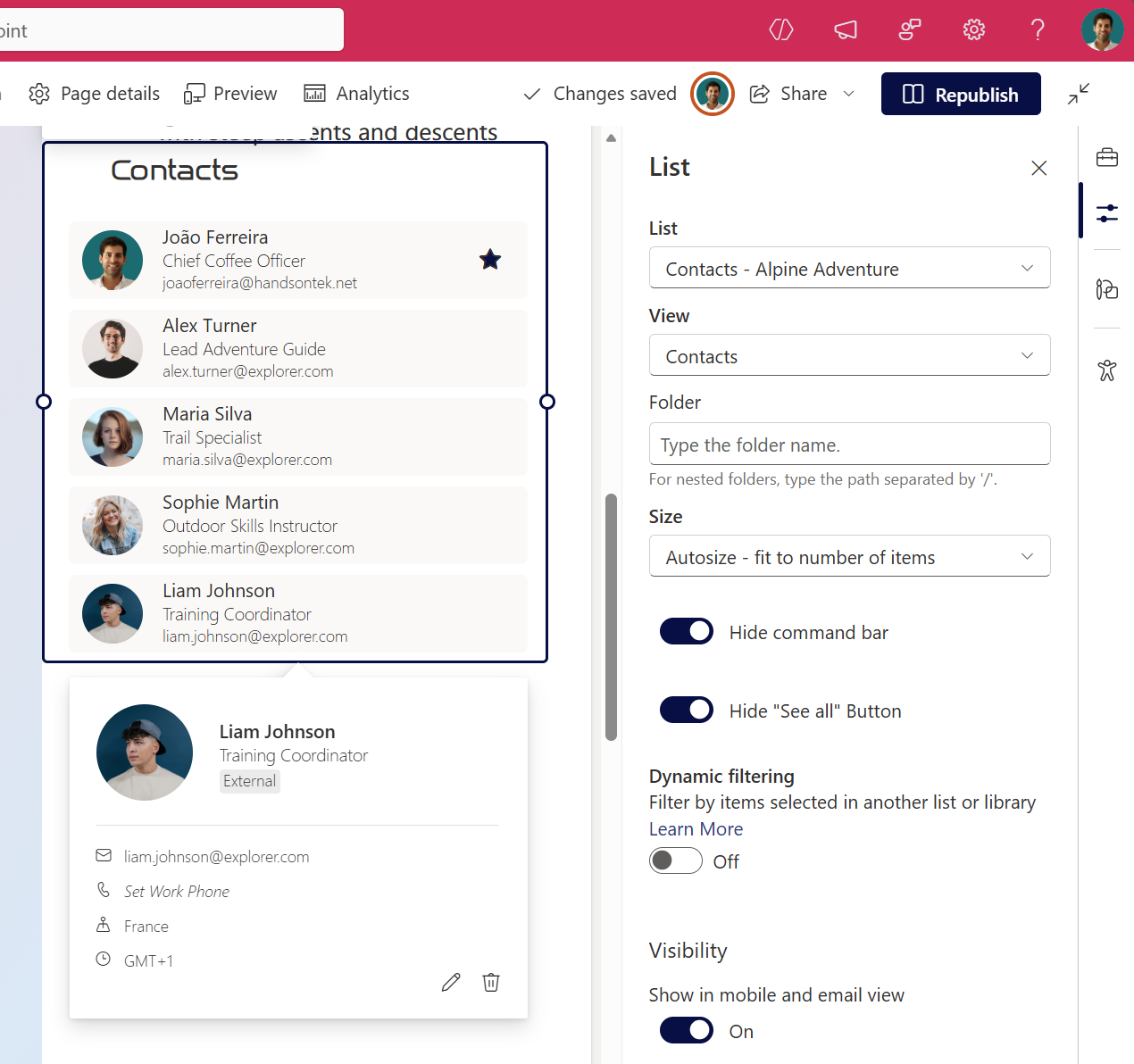
Use the Lists web part to surface the list in the project site and select the formatted view so the presentation remains consistent everywhere.
Replicate it other projects
Instead of manually creating this list for each project or consulting site, you can save it as a template and make it available for others to reuse. If you want to follow the same approach, I’ve already covered how to save and deploy custom SharePoint lists as templates in a separate tutorial.
Final thoughts
This contact list does not try to replace identity management or governance. It exists to represent how consulting projects actually work, where not every relevant person belongs inside the tenant, but every relevant person still needs to be visible.






No comments yet