

 HANDS ON SharePoint
 HANDS ON Teams
 HANDS ON Lists
 HANDS ON tek
 M365 Admin
What’s new for SharePoint – February 2026
I’m publishing this What’s New in SharePoint for February 2026 on a symbolic day. Today, SharePoint turns 25. There’s a big celebration happening, and by the time you read this, chances are new announcements are already landing. But what’s interesting is that February quietly gave us a glimpse of where SharePoint is heading—before the lights went on.
While many are waiting for what will be unveiled later today, Microsoft has already been laying the groundwork through small but meaningful updates in the roadmap and the Message Center. This month, I want to highlight two of them. The first is grounded chat for SharePoint Lists, where Context IQ in Microsoft 365 Copilot can now pull list data directly into prompts, improving accuracy and relevance. The second is the reimagined SharePoint home experience, a single, intuitive page that brings together what actually matters across the platform.
If this is what surfaced quietly in February, it sets an interesting tone for what comes next. SharePoint is clearly still evolving.
FEB
6
Discover and find people through Microsoft 365 Copilot Search based on your company’s custom profile properties from SharePoint Online.
Administrators can now set organization-wide policies to automatically expire “People in your organization” sharing links after a specified period. This helps organizations maintain tighter control over internal content sharing by ensuring links don’t remain active indefinitely. Configure expiration timeframes that align with your organization’s data governance requirements—whether that’s 30 days, 90 days, or a custom period.
FEB
9
Dark mode support is coming to the SharePoint admin center, allowing admins to switch between light and dark themes starting mid-February 2026. This optional feature improves visual comfort without affecting settings or end users, requiring no preparation or compliance changes.
FEB
10
The SharePoint Document Libraries and Lists filter pane will update by February-March 2026, offering faster performance, expandable/collapsible sections, and displaying all filterable fields without pin/remove options. No admin action is needed; update documentation and inform support staff accordingly.
FEB
11
The Web Search (Bing) image pivot in SharePoint page image picker will be retired between March and April 2026 due to the Bing Search API retirement. Authors will lose web image search but retain Stock images, uploads, and site assets. No admin action is needed; inform users accordingly.
You can now reference SharePoint libraries and OneDrive folders when creating a presentation with Copilot using Agent Mode in PowerPoint.
FEB
12
We’re excited to bring M365 Copilot in OneDrive, a new unified Copilot chat experience designed to make working with your files simpler, smarter, and more seamless across Microsoft 365.
Admins will be able to select hard delete configuration while setting up a priority cleanup policy for OneDrive and SharePoint content and skip recycle bins.
SharePoint Designer 2013 will reach end of support on July 14, 2026, with no extensions offered. Organizations must migrate workflows to supported tools like Power Automate using the SharePoint Migration Tool before this date, as Microsoft will stop providing updates or fixes after retirement.
FEB
19
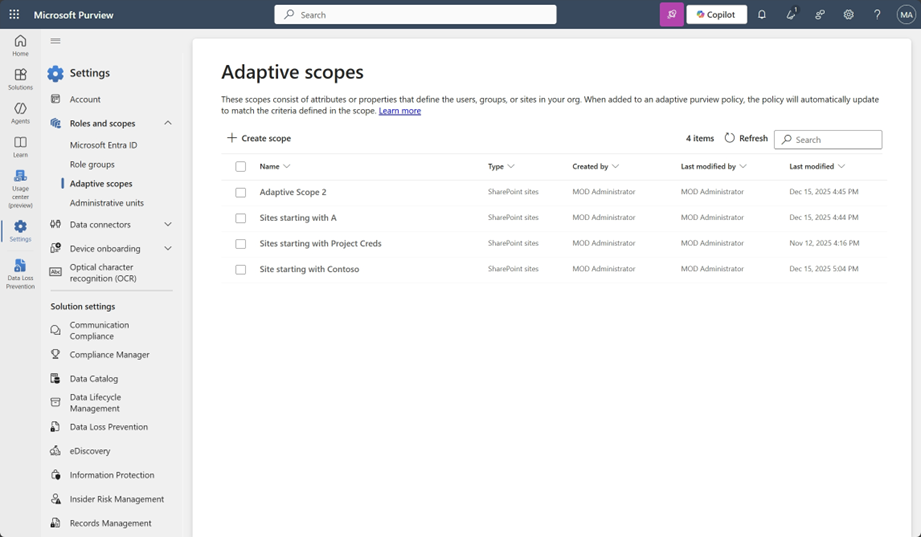
Adaptive scopes for SharePoint DLP in Microsoft Purview enable automatic targeting of sites based on attributes, reducing manual updates. Rolling out from February to March 2026, this feature improves policy efficiency and coverage without impacting user workflows but requires admin setup and appropriate licensing.
FEB
23
IT admins can now customize the local OneDrive sync root folder name on users’ Windows computers. By default, the folder is named “OneDrive – {organization name},” which can consume valuable path length for deeply nested files and folders. With this new policy, admins can set a shorter, organization-specific folder name — reducing path length issues and giving users a cleaner file system experience.
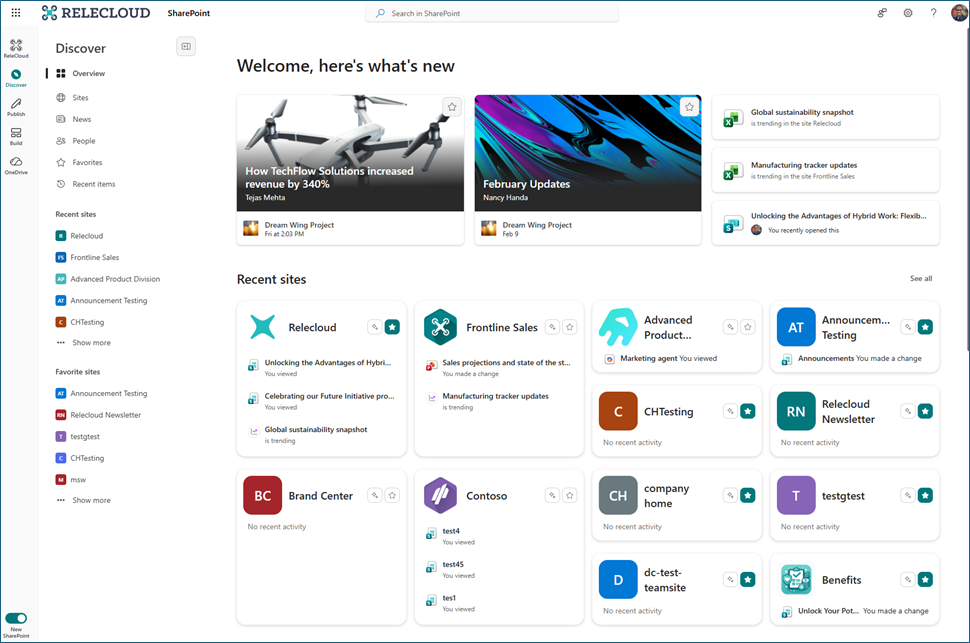
We are introducing a reimagined SharePoint experience designed to be simple and intuitive, centered on the core jobs of discovering knowledge, publishing content, and building solutions. This update establishes the foundation for AI-assisted creation across the product. This includes an updated information architecture and cohesive design language, delivering a clean and consistent experience across surfaces.
Microsoft 365 Copilot will allow users to search for and insert SharePoint Lists into chat prompts via Context IQ, enhancing response accuracy. This feature, enabled by default, rolls out worldwide from late March to early April 2026 and requires a Copilot license with no admin action needed.

FEB
26
SharePoint’s Weather, World Clock, and Events web parts will switch from Bing Maps to Azure Maps backend by late April 2026. This automatic migration affects organizations using these web parts and requires allowing atlas.microsoft.com in network settings. No changes to user experience or configuration will occur.
Microsoft 365 Copilot will enable users to transfer content from Copilot Pages directly into SharePoint News posts for seamless editing and publishing. This feature, rolling out late May to mid-June 2026, is enabled by default, respects existing permissions, and requires no action but user awareness and documentation updates.

FEB
27
SharePoint home sites are getting the following new updates – A resources web part, a new UX to customize the SharePoint app (Viva Connections) experience for Teams desktop and mobile and ability to set up a new home site in the SharePoint admin center. Additionally, Announcements web part and a new layout for News web part will be available in all sites.
FEB
28
A reimagined SharePoint experience with an intuitive design, streamlined architecture, and AI-assisted features (requiring a Microsoft 365 Copilot license) will roll out from March to May 2026. It includes a redesigned app bar with Discover, Publish, Build, OneDrive, and Home features. Enabling it is optional.
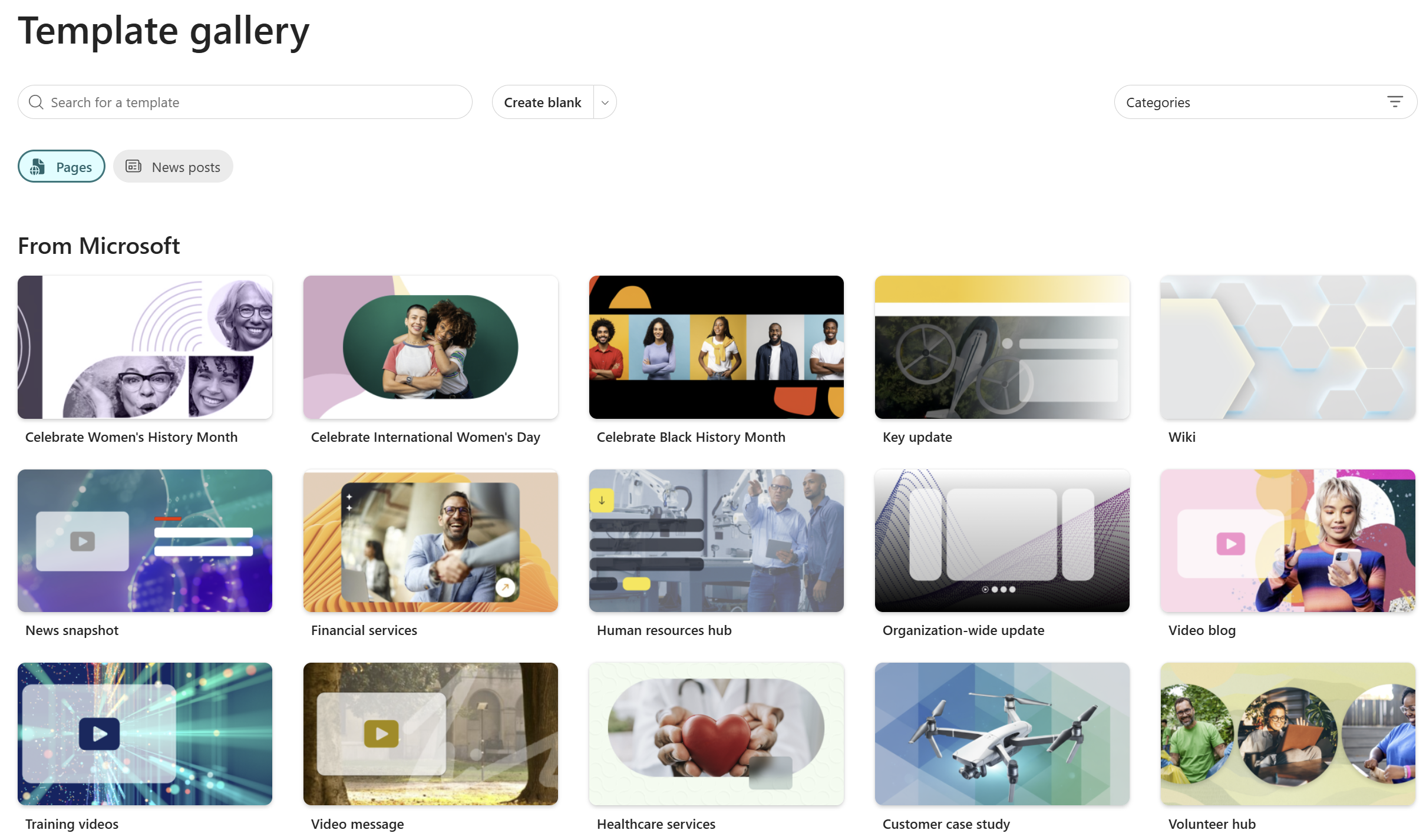
SharePoint is enhancing its page template gallery with 31 new templates, improved browsing, filtering, search, and unified Pages and News creation. Entry points are expanded across site settings, site contents, onboarding, and Stream app. The feature is enabled by default, requiring no tenant changes, rolling out March–April 2026.






No comments yet